Scoro bundles projects, CRM and invoicing into one platform, but minimum seat counts and add-ons push the price up fast. There's a simpler alternative for project-based companies.
When an agency or consultancy grows past ten people, spreadsheets and a separate invoicing tool start falling apart. Someone suggests Scoro in a meeting — “all-in-one”: projects, CRM, quotes, invoices, reporting. It sounds like the answer. Then the quote arrives with a price and a minimum seat count, and the story gets more complicated.
What Scoro does well
Scoro is genuinely comprehensive. Instead of stitching together a separate CRM, a separate quoting tool, a separate invoicing tool and a separate project tool, everything lives in one place. For consultancies and agencies with an active sales pipeline — quotes, contracts, opportunity tracking — that’s a real advantage. Profitability reporting by project or client is detailed, and linking a project to a quote and an invoice cuts down on duplicate data entry.
That’s why Scoro regularly comes up as an option when a company is looking for an “all-in-one” platform for professional services.
Why companies look for an alternative
1. The minimum seat count inflates the entry price
Scoro doesn’t offer a plan priced for smaller teams at the actual headcount — every paid plan requires a minimum of 5 seats, regardless of how many people actually need access. The Essential plan runs around $26 per user per month (billed annually), which with the 5-seat minimum works out to roughly $130 per month even for a three-person team. Standard (with resource planning) runs around $37 per user, and Pro (with CRM and advanced reporting) around $63 per user — monthly billing adds another 15-20% on top of all of these.
2. The split between Work Hub and Sales Hub
Standard and Pro plans split into “Work Hub” (project delivery) and “Sales Hub” (CRM and finance) — a company has to decide upfront which one is the priority, or pay for both. For a team that needs both project tracking and CRM equally, that means roughly double the per-seat cost.
3. The Gantt chart is an add-on, not a default
On the Essential plan, the Gantt view isn’t included — it’s added as a separate per-user add-on. For a company starting out on the smaller plan, that’s one more line item on an already growing bill.
4. Onboarding takes time
Scoro covers a lot of ground — projects, quotes, invoices, CRM, profitability reporting — and that breadth is exactly why it requires serious onboarding time. Configuring workflows, fields, permissions and quote/invoice templates typically takes weeks, not days, before a team is actually productive in the system.
5. No dedicated help desk for clients
Scoro is built around the project, the quote and the invoice — not around receiving and tracking client requests. If a client reports an issue or asks a question, it goes through email or a comment on the project, not through a structured ticket that gets assigned, tracked and automatically updates the client on status. For companies with daily client communication — service firms, IT support, agencies with a steady stream of operational requests — that’s a gap many teams will need to fill with a separate tool.
What a project-based company actually needs
Regardless of industry, every company that works for clients and bills by the hour or by project needs the same core set of things:
- Receiving and tracking requests — a client reports something, someone picks it up, someone resolves it, the client gets a response. No manual emails for every status change.
- Project management — tasks, deadlines, ownership, progress, without weeks of configuration before the first project.
- Time tracking alongside the work — hours logged directly against a request or task, ready for invoicing without manually merging data from multiple tools.
- Capacity planning — who’s free, who’s overloaded, what’s coming next week.
Scoro covers the CRM and finance parts of that list well, but the first item — structured request intake — remains an open question.
How UnitLook approaches the same problem
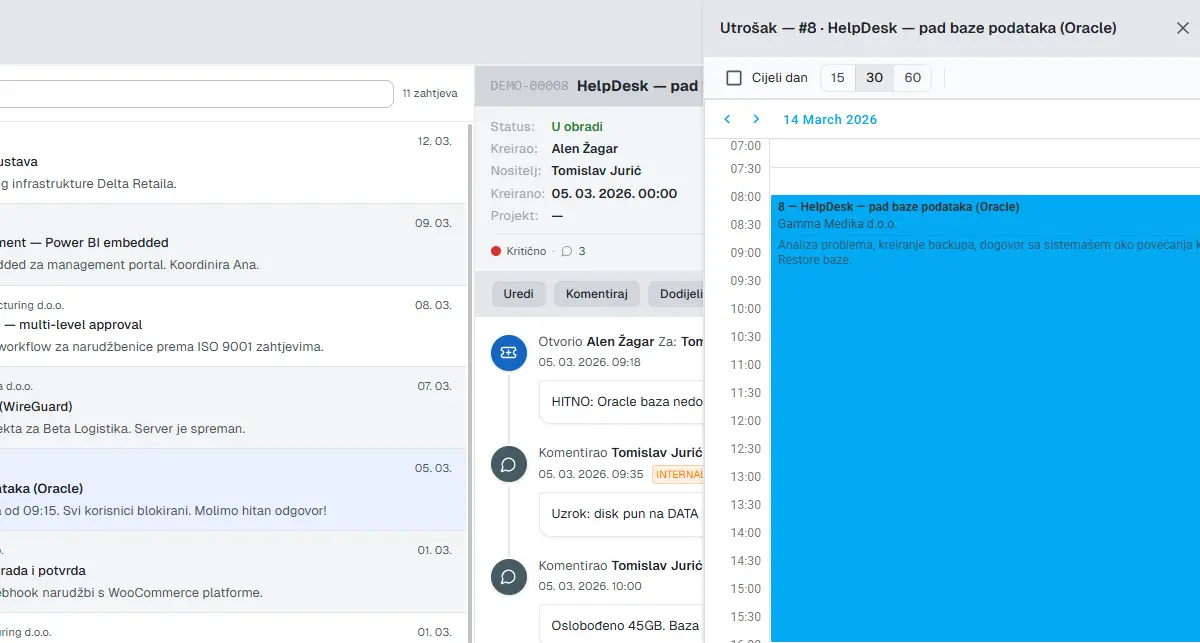
UnitLook doesn’t split functionality into modules you choose upfront. Ticketing, projects, time tracking and capacity planning are part of one subscription, from day one, with no minimum seat count.
A request becomes a project without manual handoff
A client submits a request → a ticket opens and gets assigned → the employee logs hours against that ticket → when the work grows, a project opens linked to the same client → at the end of the month, a client report generates automatically, with no exporting or merging spreadsheets.
The client portal is included, not negotiated separately
The client sees their own tickets and projects, gets an automatic email on every status change and can reply directly in the thread. Internal notes and data about other clients stay hidden — with no separate permissions configuration.
Price doesn’t scale with the number of modules
There’s no split between a “Work Hub” and a “Sales Hub,” and no paid add-on for the Gantt view. One plan covers ticketing, projects, Gantt, time tracking and capacity planning.
Onboarding takes days, not weeks
New project: name, client, deadlines, tasks, owners. The Gantt chart exists immediately. There are no templates to build first.
Feature comparison for project-based companies
| Need | Scoro | UnitLook |
|---|---|---|
| Request management (ticketing) | ❌ | ✅ |
| Client portal | ⚠️ (limited) | ✅ |
| CRM and sales pipeline | ✅ | ❌ |
| Quotes and invoicing | ✅ | ⚠️ (invoicing-ready reports) |
| Gantt chart | ⚠️ (add-on on Essential) | ✅ (included) |
| Time tracking per task/ticket | ✅ | ✅ |
| Capacity planning | ✅ (Standard and up) | ✅ (included) |
| Minimum seat count | 5 | None |
| Native EU / GDPR-based | ✅ | ✅ |
When Scoro is the right choice
If your primary problem is the sales pipeline — quotes, contracts, tracking opportunities through a funnel — and CRM matters to you as much as project tracking, Scoro covers that combined case better than most specialised tools. For consultancies where quote-based billing and per-client profitability tracking are central to the business, the depth of Scoro’s financial reporting justifies its price.
The bottom line
Scoro solves the combination of CRM, projects and finance in one place, but that breadth comes with a minimum seat count, a module split and weeks of onboarding. If a sales pipeline isn’t your priority and the real day-to-day problem is receiving client requests, tracking hours and planning your team — you’re paying for functionality you won’t use.
UnitLook is designed for that second case: ticketing, projects, time tracking and capacity planning in one subscription, with no minimum seat count and no weeks of configuration. A demo takes 45 minutes and requires no preparation on your end.
Author
Igor Lišinski
UnitLook team — we build the tool that makes everyday work easier for teams.
Interested in UnitLook?
Request a free demo and see how UnitLook can help your team — no commitment required.