
Asana is excellent for creative teams, but has no native time tracking or help desk. If you bill by the hour or manage multiple clients, there's a better fit.
Asana is one of the most recognised project management tools available. Well-designed, powerful, genuinely pleasant to use. And yet — organisations that run client work, track billable hours and manage multiple concurrent projects regularly look for something else.
The reason isn’t a bad product. It’s the wrong product for that type of work.
What Asana does well
Asana excels at visual task coordination: marketing teams, creative agencies, product teams running campaigns or launches. Every task has an owner, a deadline, comments and a status. List, board, timeline — it’s all there.
For what it is, Asana is a genuinely strong solution. The problem arises when that tool is applied to a different kind of work.
Where Asana falls short
1. No native time tracking
Asana has no time tracking. There are integrations with Harvest, Toggl or Clockify — but each is a separate subscription, a separate interface and a separate data model.
In practice: an employee opens a task in Asana, then switches to Harvest to log hours, and the manager manually reconciles data at the end of the week because reports from the two tools don’t speak the same language.
For a firm that invoices by the hour or tracks project profitability — this isn’t a minor inconvenience. It’s a structural gap.
2. No place for external requests
Asana is built for internal teams. A client who submits a request has no natural home in your Asana workspace. You can add them as a guest, but then they either see all your internal tasks and notes — or nothing useful at all.
Organisations that receive requests from clients (service companies, IT firms, consulting practices) don’t have a natural place in Asana for a ticket that arrives externally, gets handled internally and sends a response back to the client.
3. Pricing climbs with advanced features
Asana Free and Starter plans are limited. The features that project-based firms actually need — advanced reporting, project portfolios, capacity management — only arrive in the Business plan, priced per user.
For a team of fifteen on the Business plan (around $24.99/user/month), that’s approximately $375 per month, or $4,500 per year — just for task management, without time tracking and without a help desk, which are separate subscriptions on top.
4. Portfolio view requires a premium tier
If you work for multiple clients simultaneously and need a single-screen overview of all active projects — with deadlines, statuses and alerts — that’s the Portfolios feature, which is exclusively available in Business and Enterprise plans.
For an agency of eight to twenty people with, say, twelve active clients — this is a basic operational need, not a premium add-on.
5. No meaningful overallocation warnings
Asana has a Workload view in the Business plan, but it isn’t integrated with a time log. You see how many tasks someone has, but you can’t see whether that employee is already over capacity because half their week was spent on work that isn’t reflected in Asana.
True capacity planning — “who has available hours next week for a new project” — isn’t solvable in Asana without external tooling.
What a project-based firm actually needs
Consider a typical week:
- Client A submits a change request — someone needs to pick it up, resolve it and notify the client
- Client B has approved a new project — tasks need planning, people assigned, deadlines set
- A manager asks how many hours were spent on Client C this week and whether they’re billable
- A new colleague joins a project — they need access to context without seeing everything else in the system
These aren’t four separate problems. They’re one continuous workflow that requires:
- A help desk — client requests with a communication thread and status tracking
- Projects — tasks, deadlines, a Gantt view, client context
- Time tracking — tied to specific tasks and clients, not a separate tool
- Reports — by client, by employee, by project — ready for invoicing and analysis
Asana covers one of these four areas solidly, one partially, and two not at all.
How UnitLook fills those gaps
UnitLook was developed to serve exactly this type of organisation: firms that work for clients, run projects and track hours that are either billed or analysed for profitability.
Time tracking built into the work
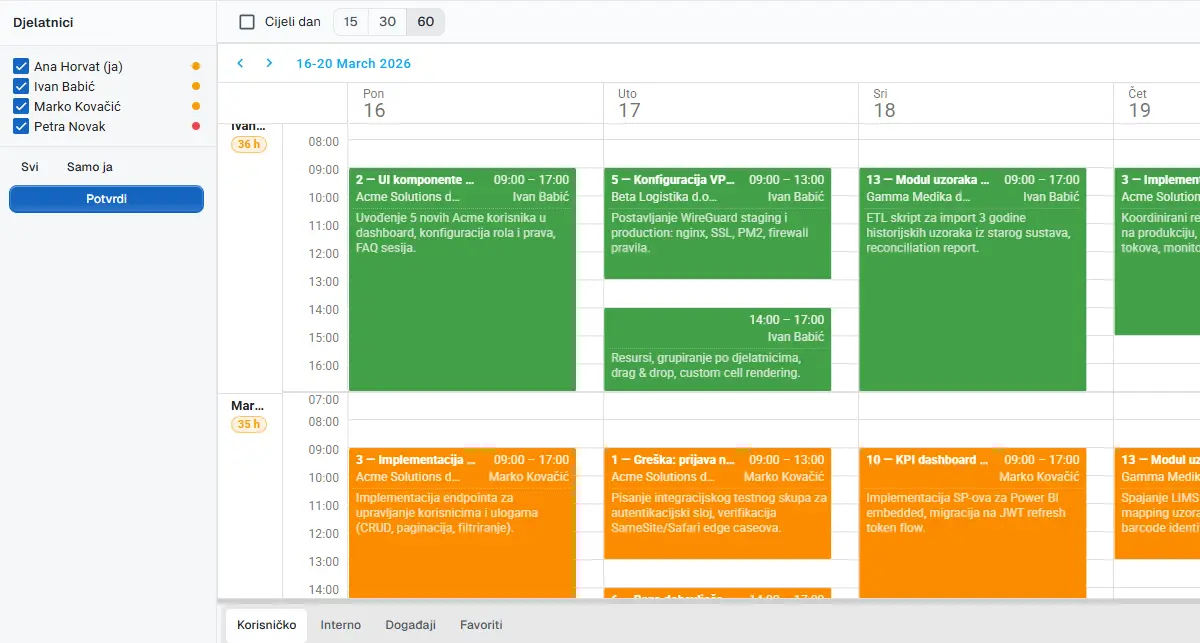
An employee opens a ticket or task and logs hours directly — with a description. The manager sees a weekly breakdown by employee without collecting data from external tools. At the end of a week or a project, the client report is ready in a few clicks.
Client requests with structured communication
A ticket arrives from a client (via form, email or internal entry), gets assigned to a team member, moves through statuses, and every status change automatically sends an email to the client. The client sees only their own tickets — no access to internal notes or other clients’ work.
Planning without blind spots
The weekly and monthly scheduler shows who is free, who is over capacity and what is already planned. When a new task is assigned, the system immediately flags whether that person has the available hours or is already overbooked.
Projects and Gantt without configuration
New project, tasks, deadlines, assignments — without setting up workflow schemas, board configurations or permission hierarchies. The Gantt chart is created automatically and updates when deadlines change.
Feature comparison for project-based firms
| Need | Asana | UnitLook |
|---|---|---|
| Task and project management | ✅ | ✅ |
| Gantt chart | ✅ (Business) | ✅ |
| Native time tracking | ❌ | ✅ |
| Help desk / ticketing | ❌ | ✅ |
| Client portal | ❌ | ✅ |
| Invoicing-ready reports | ❌ | ✅ |
| Capacity planning (with time data) | ⚠️ (Business, no time) | ✅ |
| Project portfolios | ✅ (Business) | ✅ |
| Croatian language support | ❌ | ✅ |
| EU-based, GDPR-native | ❌ | ✅ |
When Asana is still the right choice
Asana remains an excellent solution for specific contexts:
- Marketing teams coordinating campaigns without billable hours
- Creative agencies with well-defined internal projects and no client portal requirement
- Product teams working on one or two products without external client access
- Teams embedded in the Atlassian or Google Workspace ecosystem
If your work is primarily internal and clients aren’t part of your workflow — Asana is a legitimate strong choice.
The bottom line
Asana is a category leader in task and project management. But task management isn’t the same problem as running a professional services firm.
Organisations that work for clients, bill by the hour and need visibility into project profitability need a tool designed for that model from the ground up — not one that requires two additional subscriptions and manual data reconciliation.
If this matches your situation, a UnitLook demo takes 45 minutes and requires no preparation on your side.
Author
Igor Lišinski
UnitLook team — we build the tool that makes everyday work easier for teams.
Interested in UnitLook?
Request a free demo and see how UnitLook can help your team — no commitment required.