Monday.com is powerful, but requires configuration for every use-case. Teams that run client projects need a system that's ready from day one — not a blank board to build from scratch.
Monday.com markets itself as a “Work OS” — an operating system for work. The idea is compelling: one platform where you can build any workflow, customise every detail and integrate everything you use.
The problem is that building a workflow requires work. Not once — every time something changes, a new client comes in or the team grows.
What Monday.com does well
Monday is visually intuitive. Adding columns, drag-and-drop rows, colour-coded statuses for a quick overview — all of it works smoothly. For teams that need a flexible board without a fixed structure, Monday is genuinely a good fit.
It works particularly well for marketing teams, sales pipeline management and creative studios with relatively standardised, repeating processes. Once configured, it can run for years without major changes.
Still, there’s a category of users who regularly move away from Monday. And the reason is always the same.
Why project-based firms look for an alternative
1. The blank canvas problem
Monday doesn’t come with a built-in concept of what a project, a client or a task means in a business sense. You decide what a “project” is, what a “client” is, what columns mean and how statuses behave.
For a marketing team with clear, repeating processes — this is freedom. For a consultancy or IT agency that needs to start using a tool now and doesn’t have a week to configure it — this means being left to your own assumptions.
The result? Every company ends up with their own “Monday version” that every new employee needs to be walked through before they can use it.
2. Time tracking is a workaround, not a system
Monday has a “Time Tracking” column. It records how long was spent on a row in a table — that is, on a task, if you’ve structured your board that way.
That is not a time tracking system. There is no weekly breakdown by employee. No aggregation by client for invoicing. No approval workflow for logged hours. No report that says “Client A consumed 38 hours this week, of which 22 are billable.”
For an organisation where time tracking is a legal requirement or the basis for invoicing — this is a gap at the centre of the system.
3. Cost grows with headcount and features
Monday charges per user, with minimum seat counts per plan. Advanced features — automations, cross-board dashboards, guest access, advanced reporting — are gated behind higher tiers.
For a team of fifteen on the Pro plan (around $19/user/month), that’s $285 per month, or $3,420 per year. For a team that also needs a separate time tracking tool and a ticketing solution, total annual spend can exceed $6,000 without arriving at an integrated solution.
4. No client portal concept
Monday is an internal team tool. A client cannot track the status of their own requests. You can share a board with guests, but that means the client either sees too much or too little — there’s no natural logic for “the client sees only what belongs to them.”
Every status change requires a manual email or notification to the client. In tools designed for client-facing work, this is automated.
5. Every new project is a new configuration exercise
Open a new project in Monday. Need the same columns as the last project? Copy the board. Automations? Copy and adjust. Dashboards? Reconfigure. Permissions for a new client? Set up manually.
For an agency that opens eight to twelve new projects a year, this is not a small overhead. Each project carries administrative work that simply doesn’t exist in structured tools.
What a project-based firm needs from day one
Every organisation that works for clients and tracks time or outcomes has an identical set of core needs:
Receiving and tracking requests — a client asks for something, someone picks it up, someone resolves it, the client gets a response. This needs to work automatically, without manual emails for every status change.
Project management — tasks, deadlines, responsibilities, progress visibility. Not as a board you built yourself, but as a conceptual whole that understands what a project is.
Time tracking alongside the work — hours logged against a ticket or task, not in a separate tool. Aggregated by client and employee, ready for invoicing and analysis without manual consolidation.
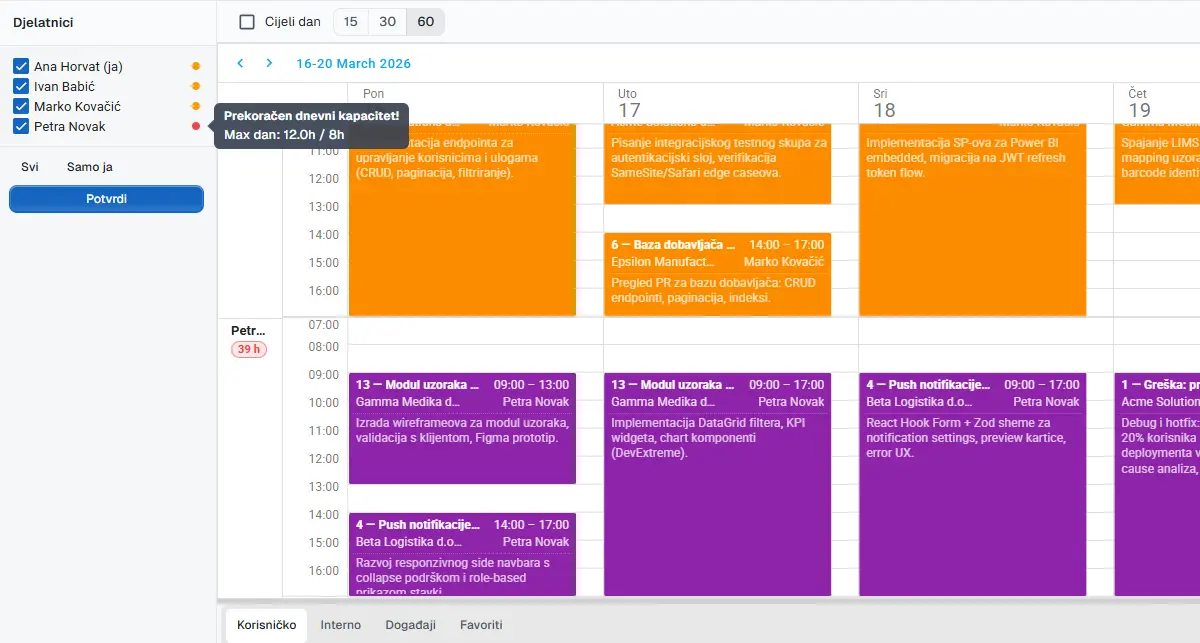
Capacity planning — who is free, who is overloaded, what’s coming next week. Without it, managers work on gut feel and either burn people out or miss deadlines.
Monday covers one of these four requirements by default, the others need configuration, integrations or manual workarounds.
How UnitLook approaches the same problem
UnitLook is not a blank canvas. It’s a tool that knows from day one what a client is, what a project is, what a ticket is and what time tracking means — and how those four concepts connect.
Structure without setup
Open a new project: enter a name, a client, deadlines, add tasks and assign people. That’s it. A Gantt chart exists immediately. Time tracking is linked to the project and to the client automatically. No board template to copy.
Client communication without manual emails
A ticket changes status — the client receives an email. A team member leaves an internal note — the client doesn’t see it. The client replies by email — the reply appears in the thread automatically. All of this without any configuration.
Time tracking as a first-class feature
Every hour is linked to a specific ticket or task. The manager has a weekly breakdown per employee, updating in real time. At the end of a project or billing cycle, the client report is ready in a few clicks — split by billable and non-billable hours.
Overallocation warnings that actually work
The weekly scheduler shows the capacity of each employee. When a new task or project is assigned, the system immediately flags whether that person has the available hours or is already overbooked. Managers make decisions with information, not on assumption.
Feature comparison for project-based organisations
| Need | Monday.com | UnitLook |
|---|---|---|
| Flexible workflows | ✅ | ⚠️ (structured) |
| Project and task management | ✅ (with config) | ✅ |
| Gantt chart | ✅ | ✅ |
| Native time tracking (real system) | ❌ | ✅ |
| Help desk / client ticketing | ❌ | ✅ |
| Client portal | ❌ | ✅ |
| Billable hours by client | ❌ | ✅ |
| Capacity planning (with time data) | ❌ | ✅ |
| Croatian language support | ❌ | ✅ |
| EU-based, GDPR-native | ❌ | ✅ |
When Monday.com is the right choice
Monday remains a strong choice for specific contexts:
- Marketing and sales teams where visual workflow flexibility is the priority
- Organisations with repeating processes worth configuring once
- Companies that don’t bill by the hour and don’t need a client portal
- Teams that want maximum flexibility and have the resources for configuration and administration
If your work is primarily internal and clients aren’t part of your day-to-day workflow — Monday is a legitimately capable tool.
The bottom line
Monday.com is a workflow-building platform. What you build is what you get. For teams with clear, repeating processes and an internal focus — that’s genuine value.
For project-based firms that work for clients, track billable hours and need a client portal, time management and capacity planning — a blank canvas means you’re building from scratch what should have come ready-made.
UnitLook is designed for that kind of work: it arrives with structure, not an empty sheet.
If this sounds familiar, a demo takes 45 minutes — no preparation needed.
Author
Igor Lišinski
UnitLook team — we build the tool that makes everyday work easier for teams.
Interested in UnitLook?
Request a free demo and see how UnitLook can help your team — no commitment required.