
Service companies lose hours every week on manual time tracking. Learn why it's a risk, what the law requires, and how a digital system solves the problem.
Picture a typical Friday afternoon at a service company. Ten technicians come back from the field. Each hands over a slip of paper or sends a WhatsApp message: “Was at client X, worked 4 hours, installed the compressor.” Someone types it into Excel. Something gets lost. Something is illegible. The week’s billing report will be ready… sometime by Tuesday.
This scenario isn’t an exception — it’s the daily reality for most service companies with 5 to 30 employees. And while it seems to “work somehow”, the real cost of that chaos is much higher than it appears.
What the Law Requires
In most jurisdictions, employers are legally required to maintain records of working hours for every employee. This includes the date and duration of each working day, overtime hours, absences and leave taken.
Labour inspectors can request this documentation at any time. Fines for missing or incomplete records can be significant — and come with an obligation to correct the situation quickly.
Paper records and retroactively filled Excel sheets are only a legal problem when they’re inaccurate. The problem is that in manual tracking, inaccuracies are the rule, not the exception.
5 Real Problems with Manual Tracking in Service Companies
1. Entries are made retroactively — from memory
A technician who visited four locations in one day rarely logs hours on the spot. The entry happens in the evening, or the next day, or on Friday when everyone submits their weekly report. An error of 30 minutes here and there means hours of inaccurate data by the end of the month — in client billing or in payroll.
2. No connection to a specific work order or ticket
The employee writes “4 hours — client ABC Ltd” — but which job exactly? Which machine? Which intervention? Without context, the manager can’t answer the client’s question: “What did you charge us 8 hours for this week?“
3. Approval either doesn’t happen or is purely formal
Excel has no approval workflow. The manager glances at the spreadsheet once a week, assumes everything is correct and forwards it to payroll. If an error surfaces later — correction takes hours, and the client may already have received an incorrect invoice.
4. Reports are manual work
Every time someone needs to answer “how many hours did we spend on client X this quarter?” — someone sits down and manually sums data from multiple Excel files. That’s not analysis, that’s transcription.
5. Mobile entry is unusable
A technician in the field with a tablet or phone can’t meaningfully enter data into Excel. The result: entry waits until they’re back at the office, information gets lost or reconstructed from memory.
What a Good System for Service Companies Needs
A digital time tracking system for service work isn’t simply “Excel in the cloud.” It needs several key characteristics suited to field and service operations:
- Mobile entry in the field — the technician logs hours directly from their phone, right after finishing the job
- Link to a work order or ticket — every time entry is tied to a specific task, client and project
- Approval workflow — the employee submits, the manager reviews and approves, billing only starts after that
- Automatic reports — filter by client, employee or period — no manual summing
- Audit trail — every change is recorded with a timestamp and the user who made it
What It Looks Like in UnitLook
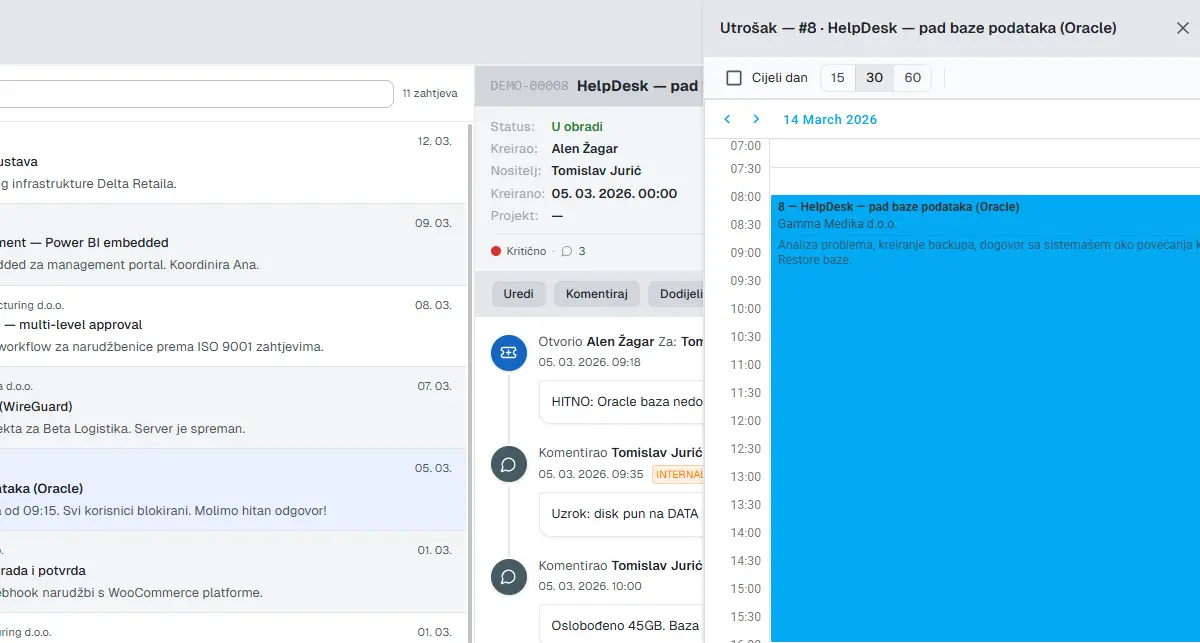
In UnitLook, the technician opens the ticket they worked on (e.g. “Air conditioning service — client ABC”) and adds a time entry with one click: date, number of hours, brief activity description. The entry is automatically linked to the client and project — no duplication needed.
The manager reviews unapproved entries daily or weekly. One click to approve — or to request clarification. Only approved entries feed into billing.
When a report is needed for invoicing — filter by client and period, press Export, and within seconds you have a CSV ready for accounting. No summing, no transcription, no waiting.
Practical tip: We recommend technicians log hours immediately after finishing a job in the field — not in the evening, not on Friday. Two minutes on-site are more accurate than 20 minutes reconstructing from memory.
What Does It Actually Save?
A simple calculation for a company with 12 employees:
- Manual tracking: approximately 2 hours per week per employee (entry, transcription, corrections)
- 12 employees × 2 hours × 52 weeks = 1,248 hours per year
- Average loaded hourly cost: €20/h
- Cost of manual tracking: ~€25,000 per year
This cost doesn’t appear as a single line item — it’s spread across the year as “lost” employee time. But added up, it amounts to roughly one full-time employee equivalent.
A digital system doesn’t eliminate that cost entirely, but realistically reduces it by 60–70%. On top of that, improved accuracy in billable hour recording can increase invoiced amounts by up to 10% — because you stop “forgetting” to log shorter interventions.
The Transition Isn’t Complicated
The most common question we hear: “What about our existing data?” The answer is: you don’t need to migrate it. Just pick a start date for the new system — old data stays in the old system for archiving.
Setting up UnitLook for a service company typically takes one working day: creating service ticket categories, adding employees, configuring statuses and the approval workflow. No coding, no consultants required.
If you’d like to see what this would look like for your specific situation — we’d be happy to talk.
Author
Igor
UnitLook team — we build the tool that makes everyday work easier for teams.
Interested in UnitLook?
Request a free demo and see how UnitLook can help your team — no commitment required.